DocumentsInvoicing software built to get you paid
Create branded invoices in minutes, convert from quotes or jobs, and track deposits, partial payments, and overdue balances. Send by email or share a secure link - perfect for billing from the field.
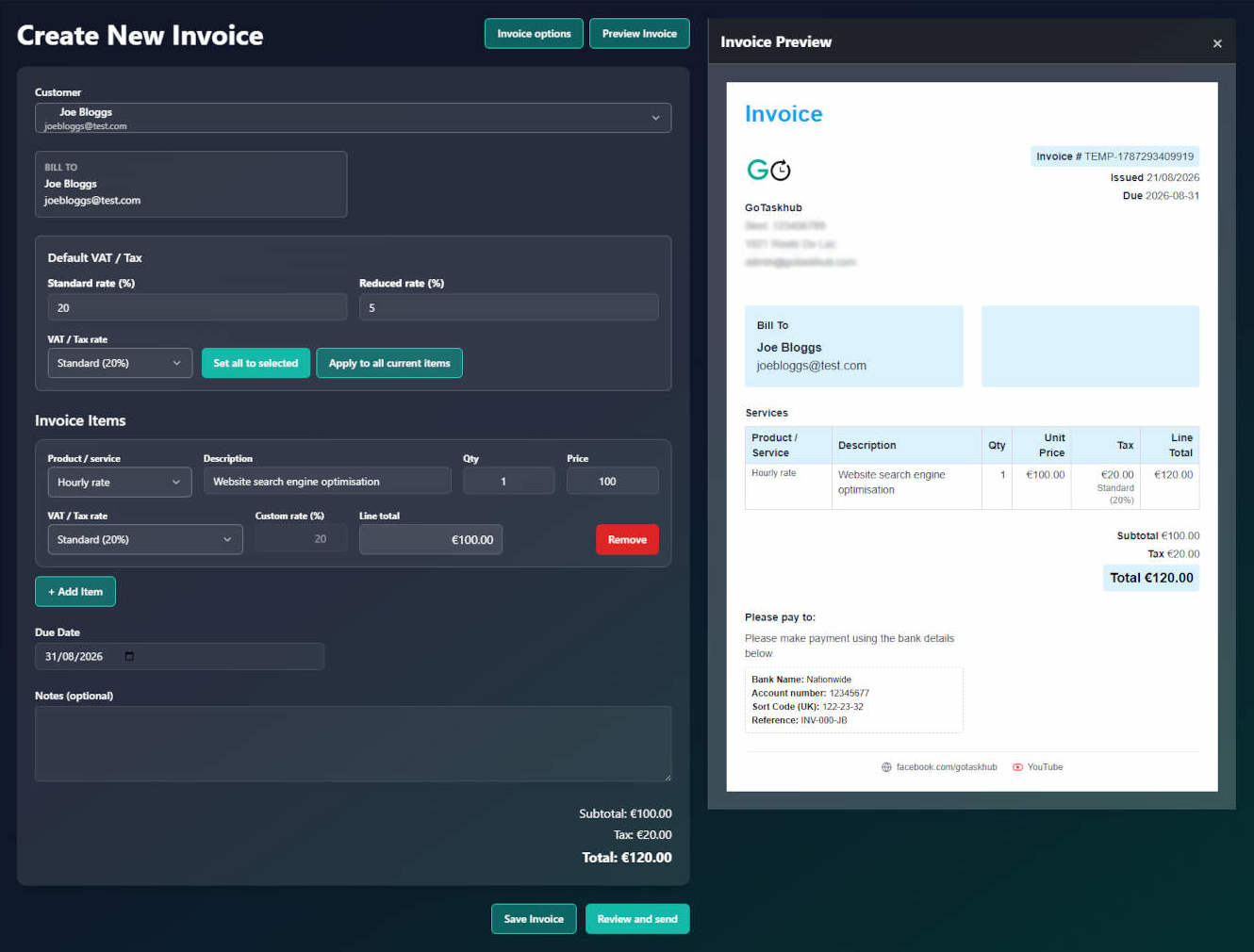
Highlights
A quick snapshot of what you can do.
Branded templates
Consistent, professional invoices with logo and brand colors.
Payment tracking
Record deposits, partials, and full payments with clear balances.
Overdue reminders
Saved views keep late invoices visible and easy to chase.
PDF export
Download branded PDFs for your records or emailing clients.
Tax & discounts
Accurate totals with tax and discount support built-in.
From quote/job
Convert approved quotes or completed jobs into invoices instantly.
How it works
Simple steps to get powerful results.
Create or convert
Start from scratch or convert from an approved quote / completed job.
Brand & preview
Apply logo/colors and preview the PDF/client view before sending.
Send to the customer
Email or share a secure link for fast approval and payment.
Record payment & follow up
Log partial/full payments and use saved views for overdue reminders.
Key Benefits
What you get out of this feature - fast.
Accurate billing
Structured line items, clear terms, and automatic totals reduce mistakes and help clients approve invoices quickly.
- Due dates & terms
- Automatic totals
- Clear balance tracking
Professional output
Keep branding consistent so every invoice looks trustworthy-logo, colors, and a clean layout.
- Branded templates
- Customer-friendly layout
- PDF export
Faster cashflow
Send invoices quickly and stay consistent with follow-ups so money comes in faster-especially on overdue balances.
- Overdue visibility
- Reminder workflow
- Less chasing
Works with your workflow
Convert from quotes and jobs to reduce admin and keep scope/notes aligned from job to payment.
- Convert from quotes/jobs
- Less re-typing
- Fewer errors
Deposit & staged billing
Handle deposits and staged invoices for larger jobs with partial payments and remaining balance tracking.
- Deposits
- Partial payments
- Progress billing
Easy migration
Import/export with CSV and keep finance records portable for reporting and reconciliation.
- CSV import/export
- Bulk updates
- Portable records
Invoicing software that helps you get paid faster
GoTaskhub Invoices is designed for trades and service businesses who want fast, accurate billing. Create invoices from scratch or convert accepted quotes into invoices, apply tax, discounts, and payment terms, then send by email or share a secure link. Track partial payments and outstanding balances, and follow up on overdue invoices with a simple workflow.
What is invoicing in GoTaskhub?
Invoicing turns completed work into clear, professional bills with accurate totals and terms. GoTaskhub keeps all the context-line items, taxes, discounts, and job details-so you can send faster and get paid sooner without re-typing.
Why invoice clarity matters
Confusing invoices slow down payments. Clear line items, due dates, and terms reduce customer questions and help invoices get approved faster-especially for trade jobs where scope can change on-site.
How GoTaskhub invoicing works
Create or convert
Build an invoice from scratch or convert an approved quote / completed job to avoid re-typing line items and customer details.
Add tax, discounts, and terms
Apply tax and discounts, add payment terms (due on receipt, Net 7/14/30), and keep totals consistent and accurate.
Send by email or link
Send invoices quickly and share a customer-friendly link so clients can view the details without confusion.
Record payments and balances
Log partial/full payments and keep remaining balances visible. This is ideal for deposits, staged work, and progress billing.
A simple weekly receivables routine
Set aside one time slot per week to check unpaid invoices, send polite reminders, and record any bank transfer payments. Consistent follow-up tends to improve payment timeframes without needing aggressive chasing.
Who invoicing is for
Whether you’re a solo tradesperson or a small team, GoTaskhub helps standardize billing so invoices are consistent and easy to reconcile.
Owner / Manager
See what’s unpaid at a glance. Standardize branding and stay on top of cashflow with simple reminders.
Office / Admin
Convert from quotes or jobs, send PDFs, log payments, and reconcile faster-no duplicate data entry.
Field Team
Capture proof on-site and hand off cleanly so invoices are complete and ready to send the same day.
Common invoicing use cases
Built for real-world trade workflows: deposits, staged payments, and billing right after a job is completed.
Job completion billing
Convert a finished job into an invoice in one click so details and scope carry through correctly.
Deposit + balance invoices
Record a deposit upfront and log the final payment on completion-perfect for larger projects.
Progress billing
Split larger projects into staged invoices while keeping all context and totals consistent.
Field billing
Send invoices from your phone after a site visit so customers receive it while the job is fresh.
Stop Funding Your Customers' Jobs: Upfront Deposits & Staged Billing
Buying materials out of pocket and waiting until completion puts all the risk on you. GoTaskhub connects the entire sequence: Quotes auto-generate deposit invoices with card checkout, payments trigger "Deposit Received" scheduling automatically, and final invoices deduct deposits cleanly.
Spreadsheets vs word processors vs GoTaskhub invoicing
Spreadsheets are flexible but error-prone. Word processors can look fine but don’t total reliably or track payments. GoTaskhub generates branded invoices with accurate totals, clear balances, and a simple process for reminders-so cashflow stays healthy.
| Capability | GoTaskhub | Spreadsheets / Word docs |
|---|---|---|
| Accurate totals | Automatic tax/discount totals | Manual formulas / mistakes |
| Deposit & partial payments | Record partials, track balance | Manual notes / no balance tracking |
| Convert from quote/job | One click conversion | Copy/paste + re-typing |
| Overdue tracking | Saved overdue views + workflow | Hard to keep updated |
| Brand consistency | Logo + colors + templates | Varies per document |
| Export + records | PDF export for audit trail | Scattered files |
Pros & cons of GoTaskhub invoicing
Pros
- Branded, professional invoices clients understand
- Accurate totals with tax and discounts
- Deposit + partial payments with remaining balance tracking
- Overdue visibility with a simple reminder workflow
- Convert from quotes/jobs to reduce admin time
Cons (and mitigations)
- Late follow-up → check overdue view weekly
- Brand inconsistency → standardize templates
- Manual re-typing → convert from quotes/jobs
- Missing proof → attach files/photos via jobs
Common invoicing mistakes (and fixes)
- Unclear terms: add due dates and payment terms to reduce delays.
- Wrong totals: use structured line items with tax/discounts for reliable math.
- No deposit tracking: record deposits as partial payments tied to the invoice.
- No reminder process: use a saved overdue view to follow up consistently.
- Brand mismatch: apply a logo and colors so every invoice looks professional.
Security & privacy
Control who can create or edit invoices with role-based access. Keep an activity history for audits and export data when needed for reporting and compliance.
Permissions
Limit invoice editing to the right roles and reduce accidental changes-especially helpful when multiple people handle billing.
Records and exports
Export PDFs and CSVs to keep finance records organized and easy to reconcile with your accounting process.
Trade Invoicing & Cash Flow Glossary
Essential terminology, billing workflows, and cash management practices used by independent UK trades and field service businesses.
- Zero Double-Entry Invoicing
- Converting an accepted quote or completed job card into an itemised invoice in one click, preserving original labour rates, merchant material costs, and customer details.
- Upfront Materials Deposit
- A structured advance payment (typically 25% to 50%) requested on quote approval to fund bulk materials and equipment hire before tradespeople arrive on site.
- Staged Milestone Billing
- Splitting larger trade contracts into progress payments tied to verifiable phases (e.g. deposit, first fix, second fix, practical completion) with separate triggerable invoices.
- Payment Terms
- The contractual settlement window on an invoice. Domestic trade best practice is 'Due on Completion' or 'Net 7', while commercial subcontracts typically specify 'Net 30'.
- Instant Card Checkout
- Embedding a secure payment link directly on the digital invoice, allowing homeowners to pay instantly via debit/credit card, Apple Pay, or Google Pay from their phone.
- Automated Payment Reminders
- Scheduled, polite email or SMS notifications sent automatically before, on, and after an invoice due date to prevent overdue balances without awkward phone calls.
- Aged Debt Tracking
- Sorting unpaid balances into standard ageing brackets (Current, 1–30 days, 31–60 days, 60+ days) so contractors know exactly which clients require prompt collection follow-up.
- Itemised Cost Transparency
- Clearly distinguishing materials, skilled labour hours, plant hire, and waste disposal so property owners understand the exact work delivered and settle invoices quickly.
- Variation Invoicing
- Billing additional works or unexpected site discoveries separately or as approved amendments, ensuring extras are paid without delaying the main project balance.
- QuickBooks Integration
- Direct export that synchronises issued invoices, customer payments, and VAT breakdown into QuickBooks Online, eliminating manual bookkeeper data entry.
- Client Portal Receipt & History
- A dedicated digital link where homeowners can download PDF invoices, view previous deposit receipts, check remaining balances, and maintain proof of payment.
- Same-Day Invoicing Advantage
- The proven operational practice of issuing invoices immediately upon job sign-off from your mobile in the van, which industry data shows gets paid twice as fast as weekend batches.
Customer reviews
Bill clearly, follow up consistently, and get paid faster without admin bottlenecks.

Emma R.
★★★★★
We invoice the same day now. Clear line items and terms cut back client questions, and payments are logged instantly.

Luca D.
★★★★★
Partial payments and deposits are simple. The branded PDFs look great and help us get paid faster.

Sofia M.
★★★★★
Reminders + saved views keep overdue balances visible. Cashflow is healthier because follow-up is automatic.
Next: send quotes first, then invoice instantly
Create quotes, get approval, convert to invoices, and keep the workflow consistent from lead to payment.
Frequently asked questions
Quick answers to common questions.
Q.What is invoicing software?
Q.Can I record partial payments and deposits?
Q.Can I brand my invoices with my logo and colors?
Q.Do you support taxes and discounts?
Q.Can I convert quotes or jobs to invoices?
Q.How do overdue reminders work?
Q.Can I export invoices as PDF?
Q.Is GoTaskhub invoicing mobile-friendly?
Q.Can customers pay online?
Learn how to generate professional invoices, take card payments, and issue receipts.